A Mac app for value investors

Your portfolio,
well kept.

Claude is brilliant at judgement and unreliable at bookkeeping. Moatfold does the bookkeeping: your whole trade history, real returns, an honest benchmark and every analysis you have ever run, so Claude's research lands on numbers you can trust.

  • Data stays on your Mac
  • Read-only towards your broker
  • Bring your own Claude
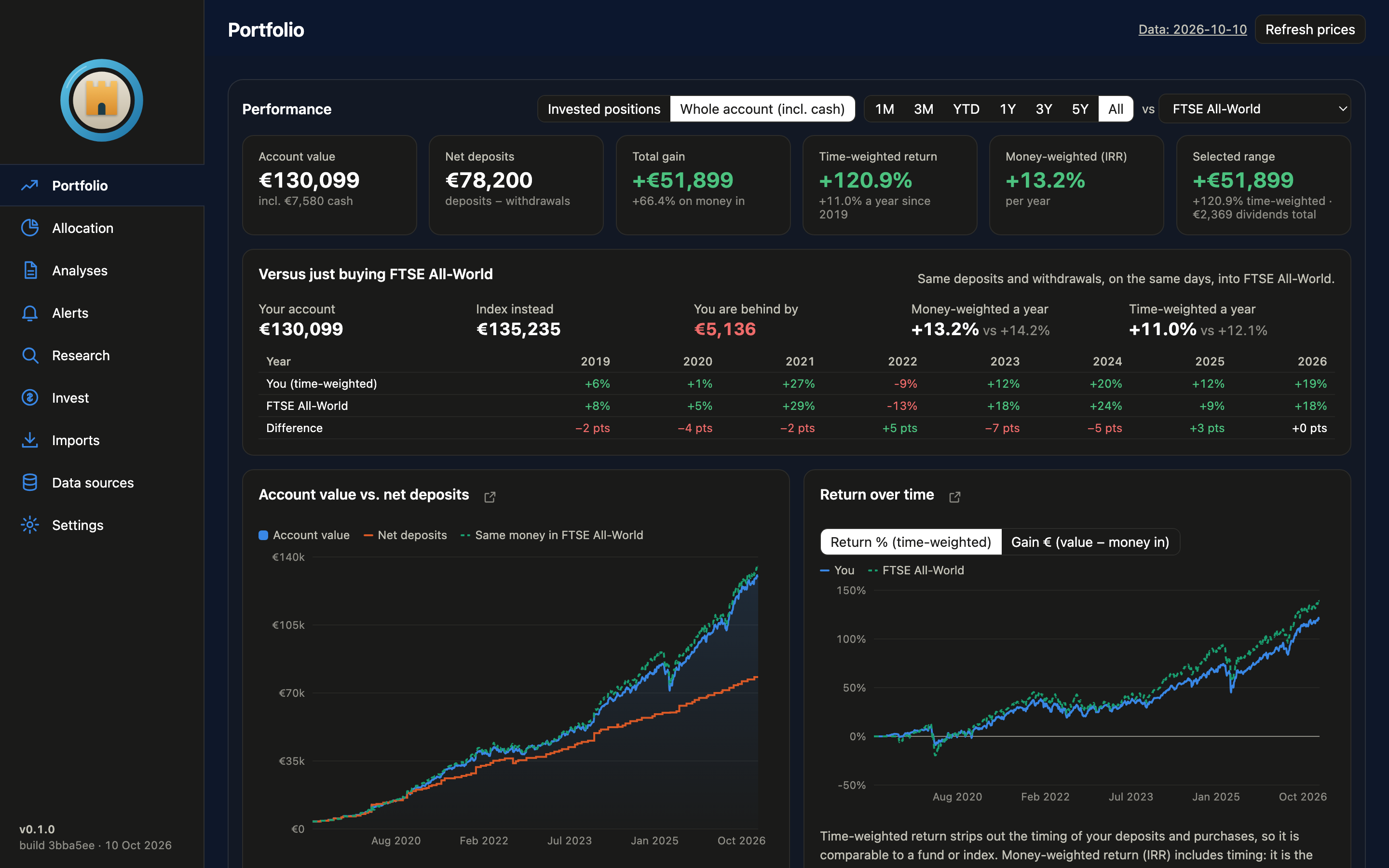
The Moatfold Portfolio screen in dark mode: account value, net deposits, total gain, time- and money-weighted returns, a comparison with buying FTSE All-World with the same deposits, and charts of account value and return over time.

The real app, showing its built-in demo portfolio of a made-up investor.

Why an app

A chat is a conversation. A portfolio is a ledger.

You can drop a CSV into Claude and get a thoughtful answer. Then you close the tab. Moatfold gives that same intelligence a memory, a calculator it can trust and a schedule, all in one quiet place.

TopicJust asking Claude With Moatfold

ContextYou paste exports into a fresh chat and explain your situation again.Your full history since the first trade is loaded every time, along with your investor profile.
ArithmeticReturns are worked out in prose, and a slipped decimal looks just as confident.Time- and money-weighted returns, XIRR and costs are computed in code. Claude never does your sums.
PricesPrices come from memory or a quick search, often in the wrong currency or before a split.Each ISIN is matched to a listing, checked against the prices in your own trades, split-adjusted and converted to EUR.
Benchmark"You beat the market" with no definition of the market or of when you put money in.Your exact deposits, replayed on the same days into a world index fund. A fair fight.
MemoryThe conversation ends and the fair value it gave you is lost in a scrollback.Every run keeps its report and calls. Fair values flow into your holdings table, and you can see how they changed.
WatchingOnly when you remember to ask.Scheduled re-analyses after results, and alerts twice a day when a holding leaves its fair range.
MethodA different prompt every time, so a different standard every time.Repeatable research skills: holdings review, one-company deep dive, theme scenario, small-cap scan.
01

Code keeps the books

Parsing, prices, currency, splits, returns and fees are plain, testable calculations that give the same answer every time.

02

Claude does the judgement

Moats, management, valuation and risks: the slow reading and reasoning, done on numbers that are already right.

03

You make the call

Moatfold never logs in to your broker and never trades. It lays out the case, and the decision stays yours.
What it does

Everything a careful investor keeps, in one place.

Import your DEGIRO exports once. From then on Moatfold keeps the history, the numbers and the research up to date, and tells you when something needs a look.

Analyses you can watch, keep and compare

Start a holdings review, a one-company deep dive, a theme scenario, a small-cap scan or a free question, and follow it live. Each run shows its cost, can be stopped, and leaves a readable report. Fair values and calls flow straight into your holdings.

A benchmark that plays fair

Your deposits, on their real dates, replayed into a world index fund. Are you actually beating just buying the index?

Allocation, looking through funds

Sector, region and country weights including what sits inside your ETFs, next to FTSE All-World.

Alerts while you get on with life

Checked twice a day in the background.

A research universe of ~10,000 companies

The ones you hold and the ones you have analysed are flagged, with the findings of every scan and theme run kept alongside.

What to buy next, and what trading cost you

A planner that respects fees and minimum ticket sizes, and a cost tracker that adds up every fee and spread so far.

Companies, prices and calls shown are made up for illustration.

Privacy

Built like a moat, around your money.

What you own is nobody else's business. Moatfold is designed so it stays that way.

  • A folder on your Mac

    Exports, analyses, caches and settings live in one data folder you choose. The app has no servers of its own and no login.

  • Read-only towards your broker

    It reads the CSV files you export. It never logs in to your broker and it cannot place an order.

  • Your own Claude access

    Analyses run through your own Claude Code or Anthropic API key, kept in the macOS Keychain. You see the cost of every run.

  • Public data, cached locally

    Prices, fundamentals and fund breakdowns come from free public sources and are cached on your machine.

To be precise: when you run an analysis, the files that run needs are read by Claude through your own account, as with any Claude conversation. Want nothing to leave your Mac? Point Moatfold at a local model in Ollama instead.

Getting started

From broker export to first review in one sitting.

  1. 1

    Export from DEGIRO

    Download the Transactions, Account statement and Portfolio CSVs. English, Dutch, German and Czech exports all work.

  2. 2

    Drop them on Imports

    Moatfold rebuilds your history day by day: value, money in, dividends, fees and returns, back to your first trade.

  3. 3

    Tell it who you are

    A short investor profile (country, horizon, style) so every analysis is written for you, not for an average reader.

  4. 4

    Run your first review

    Watch Claude work through your holdings and come back with fair-value ranges and a call for each one.

Questions

Good to know.

Is this investment advice?

No. Moatfold is a research tool. Fair values and calls are estimates that can be wrong; it lays out the reasoning so you can check it, and every decision and every trade is yours.

Do I need a Claude account?

For AI analyses, yes: Moatfold uses your own Claude Code or Anthropic API key, so you stay in control of access and cost. The portfolio, allocation, benchmark, alerts and cost tracking all work without it, and you can also use a local model through Ollama.

Which brokers are supported?

DEGIRO today, from its Transactions, Account statement and Portfolio CSV exports. Tell us which broker you use when you request an invite; it shapes what comes next.

Why is it invite-only?

Moatfold is young. We are letting people in in small groups so every new user gets a smooth start and we can fix what they run into before the next group arrives.

Does it run on Windows or in the browser?

Moatfold is a native Mac app. There are no plans for a hosted version, because keeping your data on your own machine is the point.

What happens to my exports?

They stay in the data folder you pick. Nothing is uploaded to us; we have nowhere to upload it to. Analyses read what they need through your own Claude access, or locally with Ollama.

Invite only

Ask for a place in the next group.

Moatfold opens to small groups at a time. Leave your e-mail and we will send a download link when your invite is ready.